How to generate subtitles
- Press Choose a video file and select a video of up to 100 MB and 20 minutes. MP4, MOV, MKV, WebM and most other common formats work. For a recording with no picture, use audio to subtitles.
- Pick the language spoken in the video. Automatic detection also works, but setting it yourself is safer.
- Press Generate subtitles and wait. The bar shows about how far along it is, and the words appear as they are recognized.
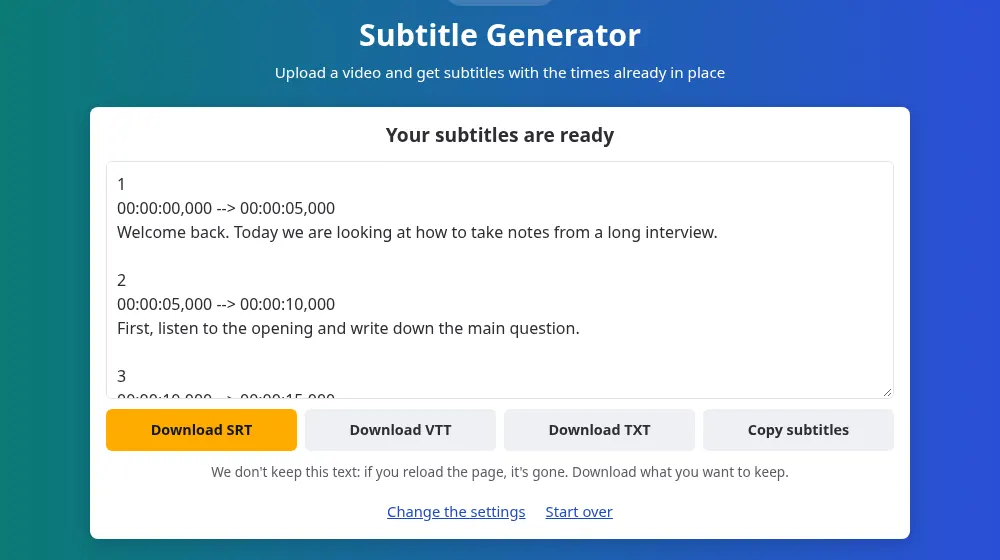
- Download the SRT or VTT file, or copy the subtitles from the box.
Which file do you need?
- SRT: the format that nearly everything accepts, including YouTube, Premiere, DaVinci Resolve and VLC. Choose this one if you aren't sure.
- VTT: the format for web video players, if you publish the video on your own site.
- TXT: only the words, with no times, for a video description or an article.
Adding the subtitles to your video
- On YouTube: open the video in YouTube Studio, go to Subtitles, and upload the SRT as a file with timing.
- In a video editor: import the SRT as a captions track. There you can choose the font and position, and burn the text into the picture if you want it always visible.
- In VLC and other players: give the SRT the same name as the video and keep both in the same folder.
This tool creates a separate subtitle file and doesn't change your video. That keeps the words easy to correct, and lets viewers turn them on or off where the platform allows it.
Subtitles for a CapCut video
CapCut can make captions of its own. A file from here is useful when you want to correct every word in a text editor before importing, or keep the subtitles after the project is gone. Generate them from the final cut, download the SRT and import it into the project:
- On a computer: CapCut's desktop program imports subtitle files into a project, from its captions area.
- On the web: CapCut's online editor accepts SRT files as well.
- On a phone: according to CapCut's help pages, the app doesn't import subtitle files directly. Import the file on a computer or on the web, save the project, and open it on your phone through cloud sync.
The file holds only words and times, so fonts, colors and animations are chosen in CapCut after importing. SaveMeTools has no connection with CapCut, which is named here only to say where the file can go.
Check them before you publish
Automatic recognition gets most of a clear recording right, but names, brands and technical terms are often wrong, and silence can produce a few invented words. An SRT is plain text, so you can fix it in Notepad, TextEdit or any text editor. Each block has a number, its times and its words: change the words and leave the line with the arrow alone. Some blocks may also hold more text than fits comfortably on screen, and you can split those in your video editor.
What makes the times and words better
- Clean sound: music under the speech is the main cause of missing words, so use a version without the soundtrack if you have one.
- One language per file: the setting applies to the whole video. If it changes language halfway through, process each part separately.
- The final cut: generate the subtitles after you finish editing, because cutting the video later makes the times stop matching.
Files that are too long or too large
Above 100 MB, extract the sound with the MP4 to MP3 converter and send it to audio to subtitles: the sound lasts as long as the video, so the times still fit. Above 20 minutes, split it with the audio cutter. Each part's times start again from zero, so you'll need to place each subtitle file at the right point in your video editor.
Looking for something else?
If you only need the words to read or quote, video to text puts the text first. If you have a script and no recording, text to speech with subtitles creates both the voice and the subtitles.
Frequently asked questions
Does the tool put the subtitles on the video?
No. You get a separate file, and your video stays as it was. To have the text burned into the picture, import the SRT into a video editor and export the video from there.
Can it create subtitles in another language?
No. The subtitles come out in the language being spoken, because the tool doesn't translate. To get another language, translate the SRT afterward and keep the numbers and times of each block untouched.
Why are my subtitles out of sync?
Most often, the video was edited after the subtitles were made, which moves everything that comes after the cut. Generate them again from the final version. If you sent a part of a longer file, its times begin at zero, so place the file at the point where that part starts.
How long does a 20-minute video take?
About 10 minutes once its turn comes, though it depends on how busy the server is. There may be a line first, and the page shows your place in it and about how long it will take. Keep the page open until it finishes.
Do you keep my video or the subtitles?
No. The file is deleted as soon as its sound has been read, and the subtitles go straight to your page without being saved. If you reload the page they are gone, so download them first. Our privacy policy explains what is recorded.
Is there a limit on how many videos I can do?
Each visitor can send up to 20 files per hour, each of up to 100 MB and 20 minutes. There's no account or payment, because the site is funded by ads. The limits keep the line moving for everyone.
Can I use a video link instead of a file?
No, it only reads files from your device. Only make subtitles for videos you have the right to use, and use the original file you saved rather than a copy from someone else.
Can I import the subtitles in the CapCut app on my phone?
Not directly, according to CapCut's help pages at the time of writing. Import the SRT on a computer or in the web editor, save the project and open it on your phone through cloud sync. Check CapCut's help in case that has changed.
Can I use the subtitles for Reels or TikTok?
Yes, through your video editor. Bring the SRT into CapCut or another editor, style the captions and export the video, then post it. The subtitle file never adds a watermark or a logo to your video.