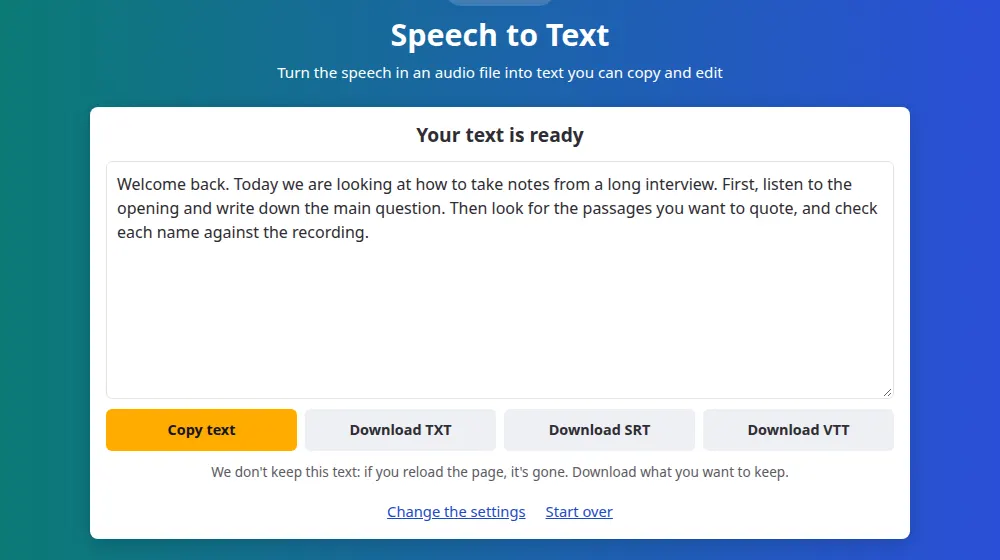
How to transcribe audio
- Press Choose an audio file and select a recording of up to 100 MB and 20 minutes. MP3, M4A, WAV, OGG, Opus and most other common formats work. For a video, use video to text.
- Pick the language spoken, or leave it on automatic detection.
- Press Transcribe and wait. The bar shows about how far along it is.
- Copy the text, or download it as TXT, or as SRT and VTT subtitles with the times.
How your file is handled
Speech recognition takes a lot of computing power, so the work is done on our server. While others are ahead of you, your file stays in your browser, and you see your place in line and about how long it will take. When your turn comes, the file is sent over an encrypted connection and the transcription starts by itself, as long as this page stays open.
The file is deleted as soon as its sound has been read, and the text only passes through on its way to your page. We keep neither of them. All we record is usage data, such as how long the file was and which language it was in.
Getting a cleaner transcript
- Reduce the noise. Music, traffic and echo cost more words than anything else. If you can, record close to the microphone.
- Choose the language. Detection only listens to the beginning of the file, so it can miss when a recording starts with music or in another language.
- One person at a time. Overlapping voices are often merged or skipped.
- Read it through. Names, numbers and technical terms are the likeliest mistakes. Silence can also produce a few invented words, so compare any important passage with the recording.
What you get
Punctuated text that you can copy in one click, a TXT file, and SRT and VTT subtitles with the time of each passage, ready for a video editor or YouTube. The tool doesn't say who is speaking: the text comes as one continuous block, so in an interview you'll need to mark who said what yourself.
Good uses for a transcript
- Getting notes from a class or a talk you recorded yourself.
- Finding a passage in an interview without listening to all of it.
- Adding subtitles to a video with the subtitle generator, and fixing them in a text editor.
- Turning a long voice message into something you can read in a meeting.
Longer than 20 minutes?
Split the recording with the audio cutter and transcribe one part at a time, with the language set by hand so that all the parts match.
Other people's voices
Only transcribe what you have the right to use. Recording someone without their knowledge is restricted in many places, and a transcript of a private conversation is as sensitive as the recording. Please don't send anything confidential, because this tool needs our server to work.
Frequently asked questions
Is the transcription really free?
Yes. There's no account and no paid plan, and the site is funded by ads. To keep it running for everyone, each visitor can send up to 20 files per hour, and each file can be up to 20 minutes long.
Do you keep my file or my text?
No. The file is deleted as soon as its sound has been read, and the text goes straight to your page without being saved. We only record usage data, such as the duration and the language. Our privacy policy has the details.
How accurate is it?
It depends mostly on the recording. With one person speaking clearly and little noise, you can expect few mistakes. With background music, several people talking at once or strong accents, errors increase. Names and technical terms deserve a second look in any recording.
How long will I have to wait?
A 20-minute file usually takes about 10 minutes once its turn comes. At busy moments you may wait in line, and the page shows your place and about how long it will take. If the line is full, try again in a few minutes.
Can it tell who is speaking?
No. The text comes out as one continuous block with no names. In an interview or a meeting, you'll need to mark who said what. The SRT file can help, because the times make it easy to find each passage in the recording.
Can I transcribe a YouTube or Instagram link?
No. The tool only accepts files from your device, and it doesn't read links. If the video is yours, send the file you saved to video to text, or extract its sound first with the MP4 to MP3 converter.
How do I transcribe a WhatsApp voice message?
Save the audio as a file first, using WhatsApp's share option, then choose it here. WhatsApp audio comes as OGG or Opus, and both work. Only transcribe messages you have the right to use, and keep in mind that the file passes through our server.