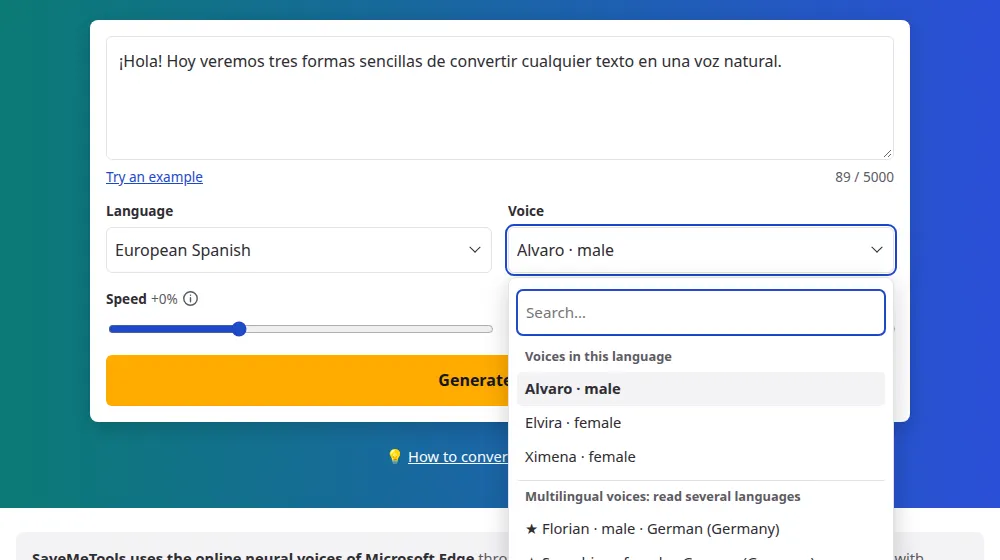
More accents than any other language here
Spanish has voices for more than 20 countries, so you can match your audience closely. In the Language menu, look for Spanish followed by the country: Spain, Mexico, Argentina, Colombia, Chile, Peru and many more.
How to make audio in Spanish
- Paste your Spanish text in the box, with its accents and opening marks (¿ ¡).
- Choose the country in the language menu: this page opens with the voices from Spain.
- Pick a voice and press Generate audio.
- Listen and download the MP3, or the subtitles in SRT and VTT.
Choosing an accent
- For Spain: the voices of Spain, such as Elvira and Alvaro, which use the distinct "z" and "c" sound.
- For a wide Latin American audience: Mexican voices are the common choice, and they're widely understood.
- For a local audience: use that country's voice. A neighbor's accent is noticed immediately.
Small details that help
Keep the accents and the opening ¿ and ¡: they guide the intonation, especially in questions. Spell out dates and amounts the way people say them in the country you're targeting.
Speed and pitch in Spanish
- Learning Spanish: Spanish can sound very fast to new learners, so start at -25% and move up to normal speed little by little.
- Different accents: the same speed can feel different from one country's voices to another's, so test the voice you've chosen instead of reusing the same setting.
- Pitch: small changes of up to 10 Hz either way are enough to adjust a voice. Beyond that, it's usually better to choose another voice.
Frequently asked questions
Is there a neutral Spanish voice?
There's no truly neutral accent, but Mexican and Colombian voices are widely accepted across Latin America. For an audience in Spain, Spanish voices sound more natural. If you're speaking to a single country, it's best to use a voice from there, when there is one.
Can I make subtitles in Spanish?
Yes. Download the SRT or VTT after generating your audio. See the subtitles tool. The times come from the voice itself, so they match what's being said, and the text keeps its accents, question marks and every other sign.
How many Spanish accents are there?
22 options, from Spain and Mexico to Argentina, Colombia, Chile and Peru, as well as the Spanish spoken in the United States. Most have one female and one male voice. They're all in the language menu, and the voice list has the complete list.
Which voice should I use for Spain?
Try Alvaro, Elvira and Ximena, which are the voices for Spain. They use the local accent, with the typical "z" and "c" sounds. Listen to the same paragraph in each of them, because their tone is quite different, and choose the one that suits your text.
Does it matter if I leave out the accents and opening marks?
Yes, it does. Accents change the stress and sometimes the meaning, as in "papá" and "papa". The marks ¿ and ¡ help the voice prepare the intonation of a question or an exclamation from the start of the sentence. It's worth writing them all.
Can I use a Spanish voice to read another language?
It isn't a good idea, as Spanish voices are made for Spanish and will read other words with Spanish pronunciation. For text in several languages, use the voices marked ★ in the menu: they have their own group and can read other languages.
Can I compare how a sentence sounds in Spain and in Mexico?
Yes. Keep the same text and generate it once with a voice from Spain and once with one from Mexico. Listening to both side by side shows the differences in the s, the z and the rhythm, which helps when choosing a voice for your audience.