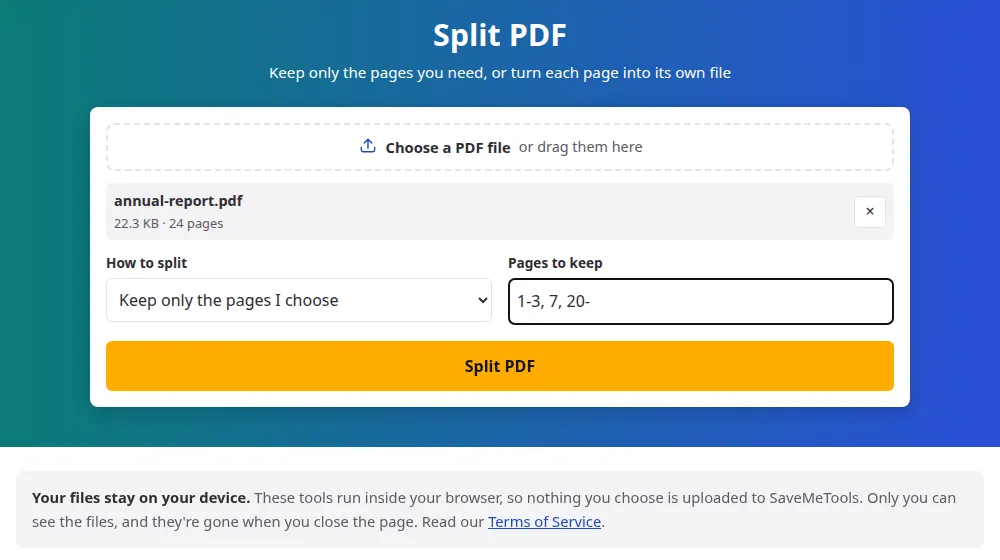
How to split a PDF
- Press Choose a PDF file or drag it to the box. You'll see how many pages it has.
- Choose whether to keep the pages you pick or to create one PDF for each page.
- If you're picking pages, write their numbers, such as 1-3, 5, 8-.
- Press Split PDF and download the result. With several files, a single ZIP saves them all.
How to write the page numbers
Separate each page or group with a comma:
- 2 keeps only page 2.
- 1-3 keeps pages 1, 2 and 3.
- 8- keeps page 8 and everything after it.
- -4 keeps everything up to page 4.
- 1-3, 7, 10-12 mixes all of these.
Pages come out in the order you write them, which makes this a quick way to rearrange a document too: 5, 1-4 moves page 5 to the front.
Common reasons to split a PDF
- An upload form limits the file size, and only two pages of a long scan really matter.
- A digital book has a chapter you want on your e-reader without carrying the rest.
- A shared bill or report includes pages with information about other people.
- A batch scan put many documents into one file, and each one needs to go to a different folder.
One file per page or chosen pages?
If you know what you want, write the numbers: you'll get a single, tidy document. Splitting into every page is better when each page stands on its own, like a stack of receipts, or when you're not sure yet. A 40-page PDF becomes 40 files, so you'll probably prefer the ZIP button to downloading them one by one.
Frequently asked questions
Does splitting reduce the quality?
No. Pages are copied into a new document without being redrawn or compressed, so text and pictures remain exactly as they were. It's not like taking a screenshot of the page.
Why is the extracted file bigger than I expected?
A page can share fonts and images with the rest of the document, and part of that shared content goes along with it. So a single page may weigh more than a simple division would suggest, especially in designed PDFs.
Can I delete a page from a PDF with this tool?
Yes, by keeping all the others. To remove page 4 from a 10-page file, write 1-3, 5-10. The original file isn't changed: you download a new one without that page.
Can I split a PDF that has a password?
No. Protected files are refused. If it's yours, open it in your PDF reader, save a copy without the password and split the copy.
How do I extract several separate chunks?
Everything you write in the box goes into one new PDF. To have each chunk in its own file, run the tool once per chunk: press Change the settings after each download, and you won't need to choose the file again.
What's the largest PDF I can split?
Up to 100 MB and 2,000 pages. Larger files can exhaust your browser's memory. On a phone the practical limit is lower, so a computer is the better choice for very long documents.