How to write a dialogue
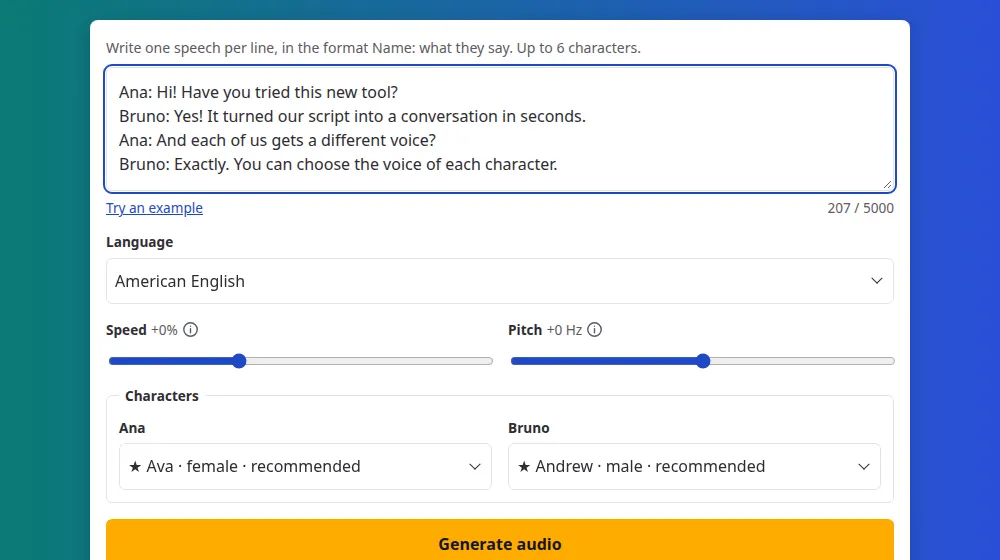
Each speech goes on its own line, with the person's name first, then a colon and what they say. As you type, SaveMeTools finds the characters and gives each one a voice menu.
- Ana: Hi, how are you?
- Bruno: Great, thanks! And you?
How to create a dialogue
- Write one speech per line, as Name: what they say. Press Try an example to see the format.
- Choose the language. A voice menu appears for each character in your text.
- Pick a different voice for each one, then adjust the speed and pitch, if you like.
- Press Generate audio, listen to the conversation and download the files.
The limits
- Up to 6 characters in a dialogue.
- Up to 100 lines, and 5,000 characters in the whole box, names included.
- One language per dialogue, chosen in the Language menu. Each character can have any voice of that language.
What you get
A single MP3 with the whole conversation, in order, plus SRT and VTT subtitles in which the first line of each speech names who is talking. As with everything here, nothing is saved: download it before you leave the page.
Where dialogues work well
- Language classes: listening exercises with two or three people, at a slower speed.
- Video scripts: two presenters instead of one, to break up a long explanation.
- Ads and phone menus: a customer and an attendant, tested before you record with professionals.
- Training: simulated conversations, for sales or customer service.
Tips for natural conversations
- Keep speeches short. People interrupt each other; real conversations rarely have long paragraphs.
- Choose contrasting voices. A female and a male voice, or two very different ones, make it easy to follow who is talking.
- Write the way people talk. Contractions, short answers and small reactions all help.
- Symbols: if your text has Markdown or emoji, such as **, # or 😀, we'll ask before removing them, since a voice may read them aloud.
Speed and pitch in a dialogue
The Speed and Pitch settings apply to everyone in the conversation at once, so they set the mood of the whole scene rather than setting one person apart.
- Pace of the scene: -10% to -20% suits a language class, while normal speed suits an ad or a video.
- Telling people apart: choose a different voice for each person instead of changing the pitch.
- Testing: try a few lines first. Longer dialogues take longer to generate, so it's worth finding the right pace before generating the whole script.
Frequently asked questions
How many people can talk in a dialogue?
Up to 6 characters, with up to 100 lines and 5,000 characters of text. If your script has more people, two minor characters can share a voice, or you can generate it in two parts with the same voices and join them in an audio editor.
Why did I get an error about a line?
Each line needs a name, a colon and a speech, as in Ana: Hello!. The message tells you which line to fix. Blank lines are ignored, so you can use them to organize your script. A long speech should stay on one line, with no line break.
Can two characters speak in different languages?
One language is chosen per dialogue. The voices marked ★ can also read other languages, so they're the best option for mixed text. Try a short line first: a phrase in another language within a sentence works better with those voices than with the others.
Can I get each speech as a separate file?
No. You get one MP3 with the whole conversation. To edit each speech separately, generate them one at a time on the text to MP3 page, and put them together in your audio or video editor.
Can two characters have the same voice?
Yes, the menus don't prevent it. It's useful for minor roles, such as a passer-by or a waiter who only speak once. For the main characters, different voices make a conversation much easier to follow, especially when listeners can't see any names on a screen.
Can I get subtitles for a dialogue?
Yes. Along with the MP3, you can download the SRT and VTT files, already timed to the conversation. The first line of each speech starts with the character's name, so viewers always know who's talking, and you can edit that out in any text editor.
Can I make a podcast-style conversation?
Yes, for a short one. Write the exchange line by line, give each host a voice and download it all as a single MP3. A dialogue holds up to 5,000 characters, so a longer episode is easier to make in parts with the same voices.