SaveMeTools uses the online neural voices of Microsoft Edge through the open-source edge-tts library, and isn't affiliated with Microsoft. Your text is used only to create the audio, and neither the text nor the audio is kept. Read our Terms of Service. The voices marked Kokoro come from an open-source model that runs on our own server, not from Microsoft.
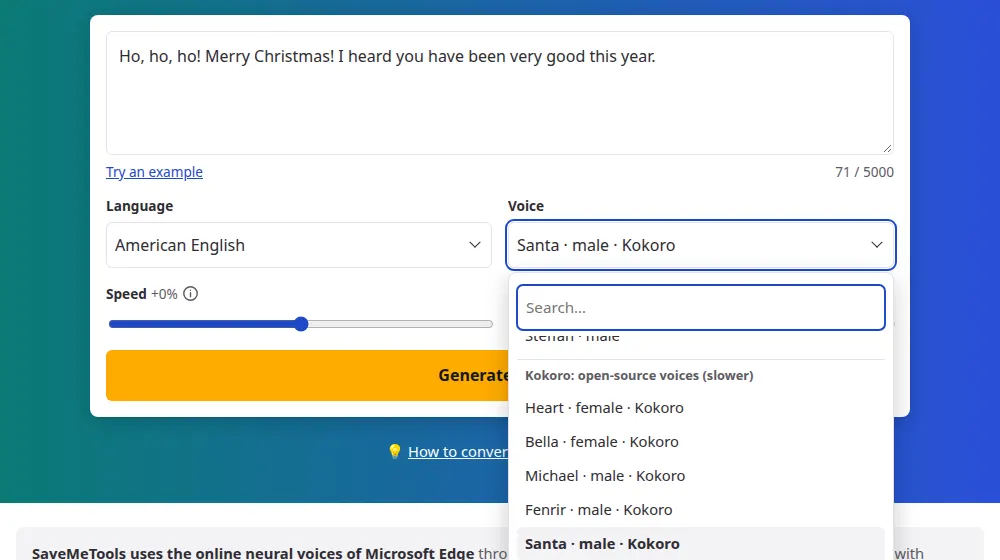
Write what Santa should say, press the button and download the audio. The voice on this page is called Santa: it's one of the voices of Kokoro, an open-source text to speech model, and it speaks American English, Brazilian Portuguese and Spanish. It suits a message with a child's name, a greeting for the family group chat, a school party or a Christmas video.
How to make a Santa voice message
Write the message in the box, or press Try an example to start from a ready one.
Check the language and the voice: this page opens with the Santa voice in English already selected. It also exists in Portuguese and Spanish.
Press Generate audio and wait while the percentage goes up.
Listen, then download the MP3 to send in a message or add to a video.
Tips for a message that sounds like Santa
Write the laugh with commas: "Ho, ho, ho!" gets a short pause after each one.
Use the child's name and one or two real details, such as something they did well at school or the name of their pet.
Keep the sentences short. A speed of -10% makes Santa sound calm and unhurried.
Write numbers and ages in words, such as "seven years old", so they're read the way you expect.
What you can make with it
A message for a child: Santa says their name, what they did well this year and that he's on his way.
A greeting for family and friends: an audio to send in the group chat on Christmas Eve.
Videos and reels: a voice-over for Christmas content, with the SRT subtitles that come with the audio.
Shops and events: an announcement for the store, the school party or the office gift exchange.
Three languages, one Santa
The Santa voice exists in American English, Brazilian Portuguese and Spanish. When you choose one of these languages in the menu, its Santa is selected with it. Write the text in that same language, because each voice only reads its own well. For any other language, choose a deep Microsoft voice in the same menu and lower the pitch a little.
Frequently asked questions
Is the Santa voice generator free?
Yes. You don't need an account or an app, and the audio has no watermark. Each message can have up to 5,000 characters, far more than a Christmas greeting needs, and you can make several, one after the other.
Which languages does Santa speak?
American English, Brazilian Portuguese and Spanish. They're three voices with the same name, one for each language, so write your message in the language you chose. A text in another language would be read with the wrong sounds.
Can Santa say my child's name?
Yes, just write it in the message. If the voice says an unusual name wrong, write it the way it sounds and test it in a short sentence before making the whole message. You can change the text and make the audio again as many times as you need.
How do I send the audio in a message?
Download the MP3 with the button under the player. Then open the conversation in your messaging app, attach the file as audio or as a document, and send it. On a computer, you can usually drag the file into the conversation.
Why does the audio take a little while to be ready?
The Santa voice is one of Kokoro's, which run on our own server and make the audio one sentence at a time. A message of a few sentences is ready in some seconds, and the percentage on the screen shows how far along it is. At busy hours you may have to wait for your turn.
Can I change how fast or how deep Santa sounds?
The speed, yes, from -30% to +30%; a little slower usually suits him. Kokoro's voices have no pitch control, so the pitch slider is turned off while this voice is selected.
Is the message I write kept anywhere?
No. The text goes to our server only to make the audio, and neither the text nor the audio is stored: once you leave the page, they're gone. That includes the names you write, so download the MP3 if you want to keep it.
Is this the voice of a real person?
No. It's a synthetic voice made by a speech model, and it was named Santa by the model's authors; it doesn't imitate any actor or recording. Use it for greetings and for fun, not to make someone believe that a real person recorded the message.