SaveMeTools uses the online neural voices of Microsoft Edge through the open-source edge-tts library, and isn't affiliated with Microsoft. Your text is used only to create the audio, and neither the text nor the audio is kept. Read our Terms of Service. The voices marked Kokoro come from an open-source model that runs on our own server, not from Microsoft.
Kokoro is an open-source text to speech model with 82 million parameters, published under the Apache 2.0 licence. It's small enough to run on an ordinary server, and many listeners find its voices close to a person reading aloud, with natural pauses and intonation. On this page it runs on our own server: you don't need to install Python, download the model or own a graphics card.
How to use Kokoro online
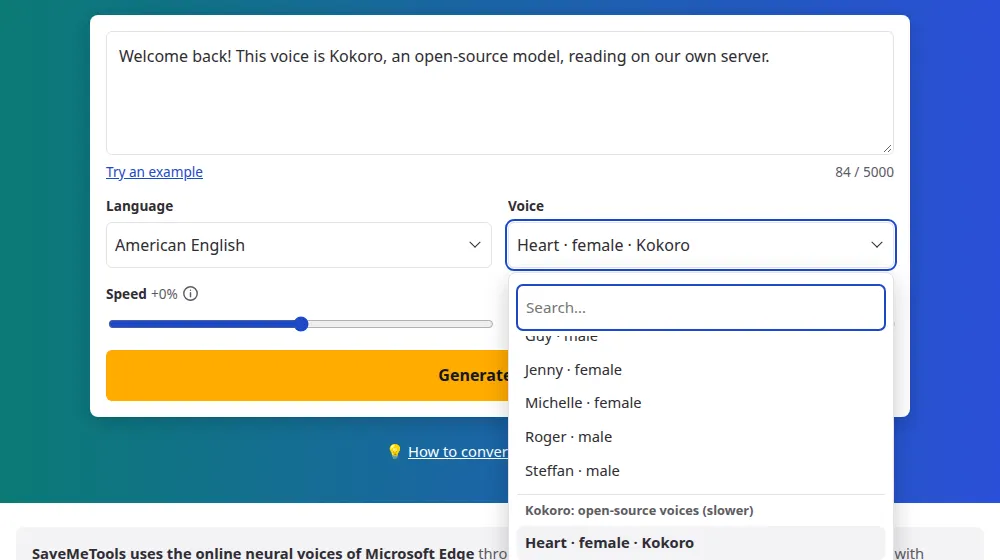
Paste or type your text in the box, up to 5,000 characters.
Choose the language. This page opens with a Kokoro voice already selected; the others are in the voice menu, in the group that starts with Kokoro.
Set the speed, from -30% to +30%, and press Generate audio.
Follow the percentage while the audio is made, then listen and download the MP3, or the subtitles in SRT and VTT.
The Kokoro voices you'll find here
That makes 16 voices. The Santa voices have a page of their own, for Christmas messages.
American English: Heart, Bella, Michael, Fenrir and Santa.
British English: Emma and George.
Brazilian Portuguese: Dora, Alex and Santa.
Spanish: Dora, Alex and Santa.
French and Italian: Siwis in French, Sara and Nicola in Italian.
Kokoro or the Microsoft voices?
Both are on this site, in the same voice menu. The Microsoft voices answer in a few seconds, cover more than 70 languages and let you change the pitch. Kokoro's speak five languages, take longer and have no pitch control, but they run on our own server, so your text isn't sent to Microsoft, and many people prefer how they sound for narration. Try the same paragraph with one of each and keep the one you like best.
Why Kokoro takes longer
Kokoro works on our own server, one sentence at a time, and each visitor's text waits its turn. A sentence takes a few seconds, and a text of 5,000 characters can take around four minutes. The percentage on the screen is real: it goes up each time a sentence is finished. When too many people are using it at once, the page says that the line is full, and you can try again a little later or choose a Microsoft voice.
Frequently asked questions
Is Kokoro TTS free to use here?
Yes. There are no credits to buy and the audio has no watermark. You can make 2 audios a day without an account, and 12 a day with a free UtilLab account; each friend you invite adds more for a week. Each text can have up to 5,000 characters, and an hourly limit keeps long Kokoro texts from taking everyone's turn.
Do I need to install anything to use Kokoro?
No. Running Kokoro on your own computer means installing Python, downloading the model and its voices, and waiting while it loads. Here the model is already loaded on our server: you paste the text, press the button and download the MP3 from the same page.
Which languages does Kokoro speak on this site?
American and British English, Brazilian Portuguese, Spanish, French and Italian, with 16 voices in all. The model has voices for other languages too, but we only offer the ones it reads well. For any other language, the Microsoft voices in the same menu cover more than 70.
Can I change the speed and the pitch of a Kokoro voice?
The speed, yes, between -30% and +30%, which is the range the model handles well; the slider stops there. Kokoro has no pitch control, so that slider is turned off while one of its voices is selected. If you need a higher or a lower voice, choose another one.
Do Kokoro voices come with subtitles?
Yes, you can download SRT and VTT files together with the MP3. Kokoro doesn't report when each word is said, so the times are worked out from the length of each sentence: they follow the speech closely, but less exactly than with a Microsoft voice. For subtitles that must match word by word, use the subtitles tool with a Microsoft voice.
Is my text stored or sent to another company?
No. With a Kokoro voice, the text goes to our own server, is used only while the audio is being made and is then discarded, and so is the audio. It isn't sent to Microsoft or to any other company, which is the main difference from the other voices on this site.
Can I use audio made with Kokoro in my videos?
Kokoro is published under the Apache 2.0 licence, which allows commercial use, and we add no restriction of our own to the audio. You remain responsible for what it says: don't use it to deceive people or to pass as a real person. Our Terms of Service have the details.
Can Kokoro voices take part in a dialogue?
Yes. In the dialogue tool, each character gets a voice menu, and Kokoro's voices are in it next to Microsoft's. You can even mix the two in the same conversation; the lines read by Kokoro just take a little longer to arrive.